Design & model.
Create and update buildings, infrastructure and building services in native CAD and BIM files.
Renzo creates models, drawings, calculations and project documentation in your AEC software, using your firm’s standards.
See what Renzo can doTell Renzo what you need and which project to work on. It uses your files, operates your software and completes the steps—from a drawing change to a full design package. You review and approve the result.
Create and update buildings, infrastructure and building services in native CAD and BIM files.
Run engineering analyses, size systems and check information across disciplines.
Produce drawing sets, calculation packages, reports and project documentation for your team to review.
From the first model to the final drawing set.
Give Renzo the work you would give your team.
Example assignment
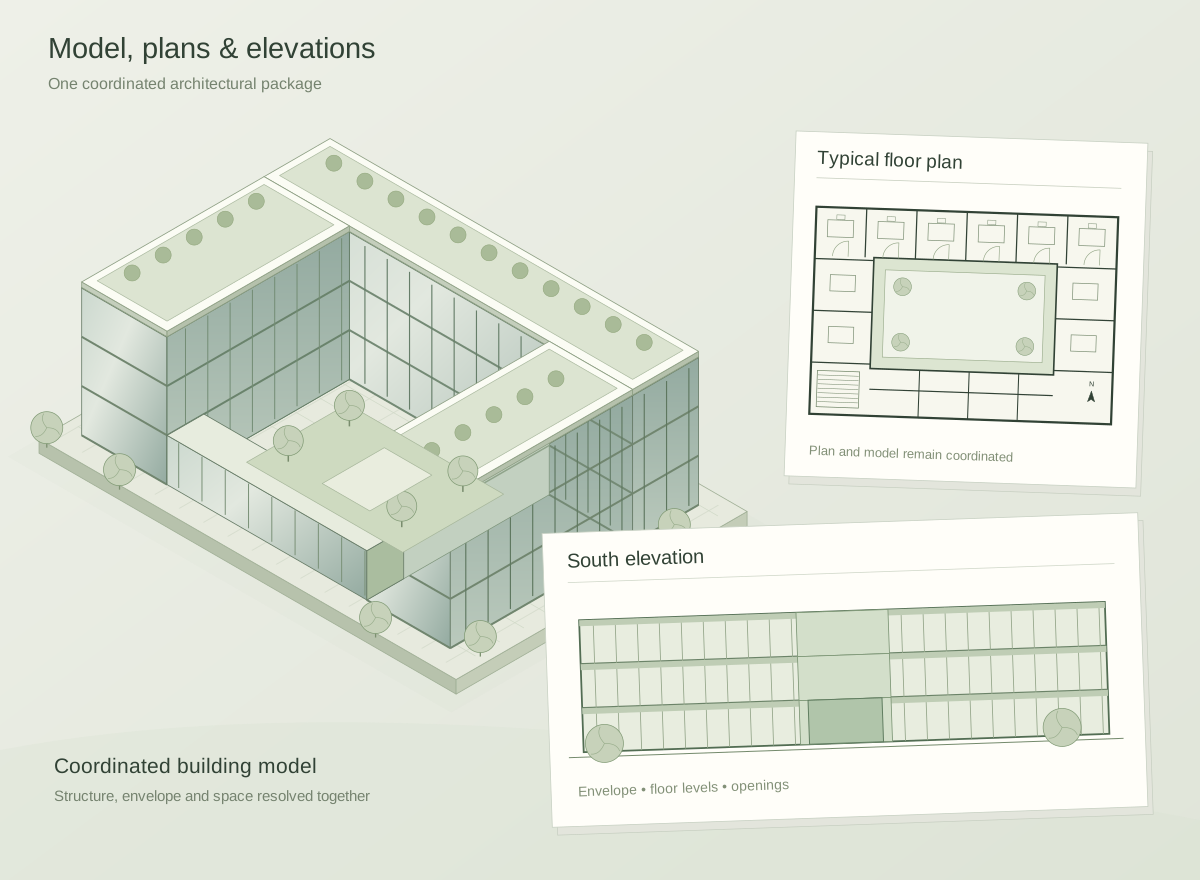
Renzo develops the building model, produces tagged floor plans and assembles coordinated views in your project files.

From a single assignment to a coordinated design package. Renzo plans the steps, works across your AEC tools and brings the results together.
Give Renzo the brief, models and drawings. It reads the project context and identifies the work required.
Drawings · BIM models · Specifications
Your approved details, calculation methods and past projects guide the work, from the first design decision.
Design standards · Templates · Past projects
Renzo develops the model, calculates the structure and coordinates building services—carrying changes across connected drawings and project files.
Design · Calculate · Coordinate
Native models, coordinated drawings and calculation packages. Your team can inspect, refine and approve the work before it is issued.
Project files · Drawing sets · Calculations
Renzo works across the software and information your team already relies on—from Revit and Civil 3D to Bluebeam and Microsoft 365.
 Revit
Revit Bluebeam
 ProcoreSAP2000
 SharePoint / OneDriveHEC-RAS
 MicroStation
 OpenRail
 Trimble Business Center
 VectorworksgINTHydraflow
 STAAD.ProRAM
 IES VE
 PowerPointAutodesk Construction Cloud
 BoxNOAAUSFWS
 Civil 3DETABS
 SketchUpTekla
 Microsoft Teams
 Slack
Slack OpenSite
 Carlson Civil
 Rhino / GrasshopperHEC-HMS
 AutoTURN
 OpenFlowsPLS-CADD
 Trane TRACE 3D
 ExcelMicrosoft Project
 Newforma
 ArcGIS / County GISUSGS
 Google Earth
 AutoCADMicrosoft 365
 Google DriveNavisworks
 Primavera P6
 OpenRoads Designer
 OpenBridge
 IFC
IFC ArchiCADSWMM
 HydroCAD
 HY-8
HY-8 RISAHAP
 WordEgnyte
 DropboxFEMANRCS
 QGIS
QGIS
We start with your projects, your files and the way your team already works. Renzo is set up around the standards and decisions that make your practice yours.
Connect previous projects, CAD templates, calculation methods and approved details so Renzo can apply them to the next assignment.
Set the direction, inspect the files and ask for revisions. Your architects and engineers retain control of the decisions and what is issued.
Choose a useful workflow with your team, establish the inputs and review process, then extend Renzo across more of your work.
Your projects carry knowledge, responsibility and confidence.
We build with that responsibility in mind.
Compliant with European
data protection requirements.
Certified information
security management.
Independent assessment
of security controls.
Independent assessment of
controls operating over time.
Renzo is agentic AI for architecture, engineering and construction. You assign a task and provide the project context. Renzo plans and performs the work in your software—creating or updating models, drawings, calculations and documents—and returns the deliverables for your team to review.
A single task or a complete design package: Revit modelling, civil drawing production, structural framing and foundation design, MEP coordination, plan reviews, drainage reports, due diligence, specifications, quantities and construction planning. Renzo can carry an assignment across multiple tools and steps.
You connect your existing project work, templates, standards and preferred details. That knowledge gives Renzo the context to follow your methods and produce deliverables that fit your practice.
No. Renzo takes on production tasks so your team can spend more time on design, judgement and client work. Qualified professionals retain responsibility for reviewing and approving deliverables.
Start with one real project and a workflow your team knows well. Establish the standards, review the output together and build from there.
Models. Drawings. Calculations. Work ready for your review.
Explore the platform